
The footage stays on your machine.The AI asks before it cuts.
Kaairos is a video editor that runs in your browser. Captions, background removal, shot descriptions and noise reduction run on your device, and every edit you ask the chat for, in your own words, arrives as a card of steps you approve or untick before anything changes.
Free, with no account. Chrome or Edge, on desktop or Android — not iPhone or iPad.
trim the first 2 seconds
cut 8 to 12
freeze the frame
Queued below — nothing has changed yet: Hold the frame at 0:04.5 of “Surf beach sunrise (9:16).mp4” for 2 s.
These edits are queued. Nothing has changed yet.
- Trim 0:02 off the start
- Cut 0:08 – 0:12 out of the timeline
- Hold the frame at 0:04.5 of “Surf beach sunrise (9:16).mp4” for 2 s
The studio’s own timeline and chat, drawn from its parts. These three asks need no download: the words decide them. Further down, the screenshot they come from.
On your machine
Nothing is uploaded. The models come to the footage.
- Gemma 4 E2B
- whisper-small
- SmolVLM2-500M
- EmbeddingGemma 2
- the two voices
 Your footage · edited here
The models run in this tab. The footage never leaves it while you edit.
Captions, background removal, shot descriptions, the chat, the voiceover and noise reduction all run inside the browser tab. There is no upload step, and no account: you open the studio and import.
What that costs. The models are one-time downloads the browser keeps (the small ones come built in), and the chat needs WebGPU. Your Library and projects live in this browser’s storage; the studio asks the browser to keep them, and backs them up to your own Google Drive, as one file, when you press the button.
What does leave, and when
A video leaves your browser only when you send it. Besides that:
- a stock search sends its words to Openverse or Wikimedia Commons;
- a live stream’s address, and its token, go to the host that serves it;
- the model files come once from Hugging Face, and their runtimes from jsDelivr.
The privacy policy says the same in full.
- Language model2.0 GB
Gemma 4 E2B · Needs WebGPU
- Chat
- Describe
- Find
- Overview
- Rough cut
- Highlights
- Speech model589 MB
whisper-small
- Captions
- Describe
- Rough cut
- Highlights
- Vision model815 MB
SmolVLM2-500M
- Describe
- Rough cut
- Highlights
- Frame search388 MB
EmbeddingGemma 2 · Needs WebGPU
- Find by sight
- Voiceover38 MB each
mms-tts-fra or mms-tts-eng
- Voiceover
- Included with the app6 MB
efficientdet-lite0, blaze-face-full-range, selfie-segmenter, gtcrn
- Describe
- Rough cut
- Highlights
- Auto reframe
- Background removal
- Noise reduction
Help, not authorship
Every edit is a card. Nothing changes until you press Apply.
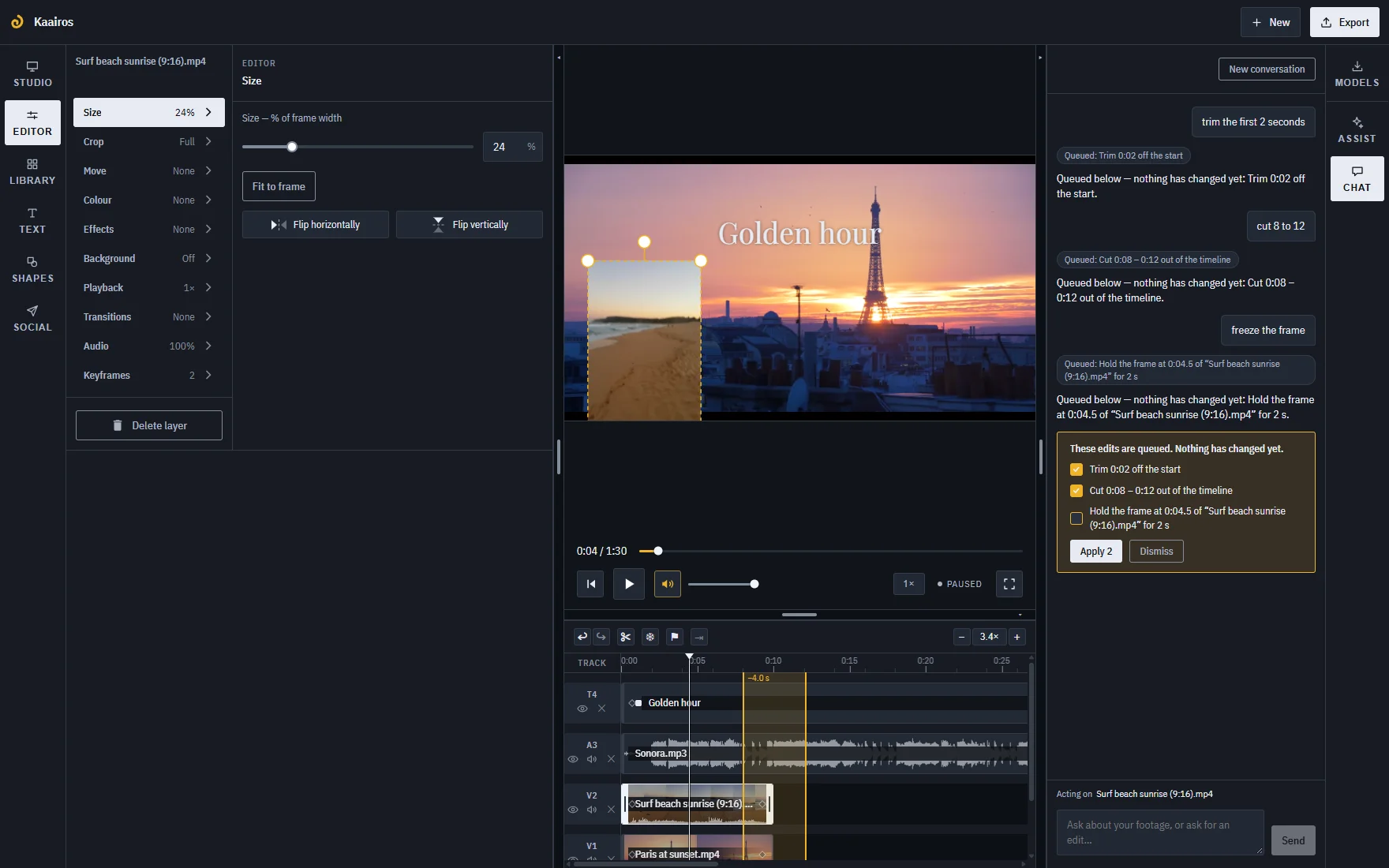
Ask the chat for an edit and it answers with a card: one line per step, each with its own box. Untick what you don’t want. Apply runs the rest, and one undo puts all of it back.
Highlights works the same way. Every moment of a clip is rated, and only the ones you leave ticked become the reel, or a set of markers.
Asks the words decide on their own — set marks, cut 5 to 10, trim the first 2 seconds, freeze the frame, format this for TikTok — are queued before the 2 GB model is downloaded, so a card is the first thing you see.
In the chat, the language model is a vocabulary, not an editor. It lets you say “pull the sound off onto a separate lane” or “darken the edges of the frame” without knowing the names of the tools, and turns that into the same steps the panels offer as buttons.
Some results are facts about the media rather than edits. Captions land on the timeline, where undo removes them; a clip’s description and an overview are written beside the media, not into the edit.
Live
Mark a stream while it is still running.
Paste an HLS address, with a token if the host wants one, and the stream becomes a layer like any clip. Watch it, set In and Out as it plays, and export that stretch. A DVR window reaches back; several feeds share one wall.
Exporting from a live stream needs timestamps in its playlist (program-date-time); without them you can mark, not export. And a stream is one reason among three: a folder of clips is just as much the point.
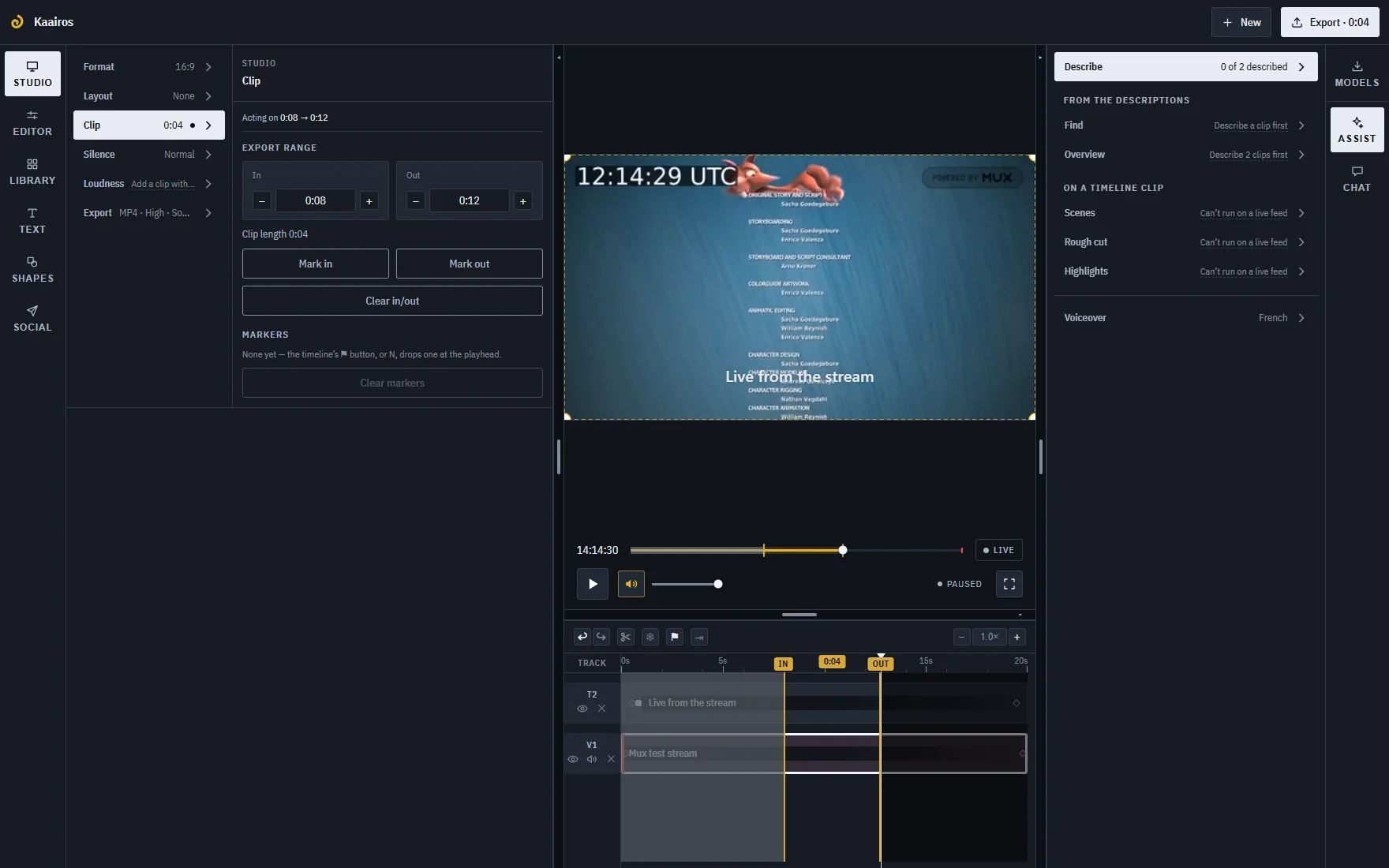
What it does
Timeline
Unlimited tracks. Trim, split, and ripple delete across every track; an insert edit that opens time on all of them. Snapping, with Alt to bypass. Markers. Speed from 0.25× to 4× and reverse on Library clips. Six transitions. Detach the audio. Undo, autosave, restore.
Picture
Keyframes on position, rotation and opacity, with easing; rotation is free, not 90° steps. Crop, zoom and pan as one control, and a Ken Burns move from that framing to another. Freeze frame. A chroma key with an eyedropper, background removal that stacks with it, blur, pixelate, glitch, vignette, looks, flip. Titles on several lines, aligned left, centre or right: 26 presets, eight bundled typefaces, eight shapes. Auto-reframe outlines the subjects and follows the one you click.
Sound
Volume to 200%, with an envelope that survives a trim and a retime; fades. Ducking, shown as bands before it dips. Silence removal measured against each source’s own noise floor, shown on the timeline before it cuts. Normalise and Level. Noise reduction for speech. A voiceover in French or English. Captions from one Whisper model in 12 languages, told which one is spoken, with a translation into English.
Out
MP4 from 480p to 4K, never upscaled, at four qualities. A plain trim of an H.264 or HEVC file is copied packet for packet, and the panel says before the click whether that is what will happen. Animated GIF, SRT and VTT. Made for YouTube, Shorts, TikTok or LinkedIn, against limits checked on a stated date. Upload to YouTube, post to TikTok and LinkedIn, a Drive link, the share sheet. Record the screen, the camera and the mic straight to MP4, screen and camera as two synced clips.
On an Android phone it is the same studio: the panels become one bottom sheet, the timeline pinches to zoom, and it installs to the home screen. Recording the screen needs a desktop.
What it doesn’t do
- No templates, stickers, GIF library, brand kit or teleprompter.
- No curated music or stock: a CC0 search of Openverse and Wikimedia Commons, and a 14-asset starter pack.
- Projects live in this browser. A backup to your own Drive is one file; there is no sync, no collaboration, and no app store app — it installs from the browser.
- A style applies to a whole title, not to one word in it.
- Noise reduction keeps every voice: hiss, hum, fans and room tone go, a crowd stays.
- The chat needs WebGPU. An ask its words don’t decide needs the 2 GB language model, as do Assist’s Overview and Find’s search of the descriptions; Find’s search of the picture needs the 388 MB frame search model instead; Describe, Rough cut and Highlights need the speech and vision models as well, about 1.4 GB more. On a phone that is storage it may not spare, and a model that runs hot and drains the battery. Without them, the asks the words decide still work.
- It needs WebCodecs, so Chrome or Edge over https, on desktop or Android. Not on iPhone or iPad, where every browser is Safari underneath, and not Firefox or Safari today.
- A live source is an HLS stream; there is no RTMP input.